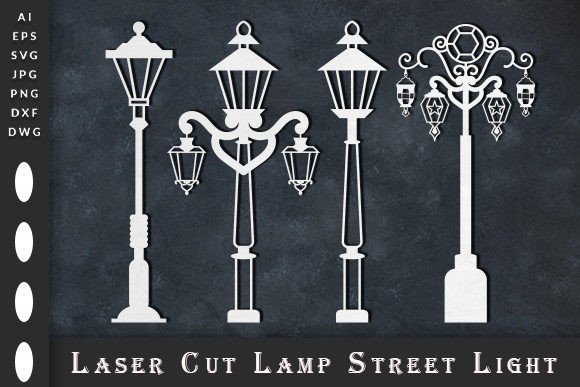
Laser Cut Lamp Street Lights SVG
Imagine transforming a simple sheet of material into a stunning, multi-layered piece of art that captures the timeless charm of a vintage street lamp. With the right design file, this is not only possible but also a delightful and rewarding creative process. The Laser Cut Lamp Street Lights SVG file offers just that—a beautifully crafted, layered design perfect for makers, crafters, and designers looking to add a touch of elegance and depth to their projects.
This specific design file is much more than a simple silhouette. It's a multilayered template engineered for precision cutting, allowing you to build a three-dimensional lamp post with incredible detail and visual interest. Whether you're using a laser cutter, a Cricut machine, or other cutting plotters, this file provides the flexibility and quality needed for a professional result. You will receive a comprehensive package including SVG, DWG, DXF, AI, EPS, high-resolution PNG, JPG, and PDF files, ensuring compatibility with virtually any design software, from Adobe Illustrator and CorelDRAW to CAD applications like Autodesk.
Creative Applications for Your Laser Cut Design
The versatility of this design asset opens up a world of possibilities. It's an ideal choice for creators who value unique, handmade aesthetics. Consider these practical use cases:
- Home Decor & Gifts: Create stunning wall art, shadow boxes, or freestanding sculptures. A layered lamp design makes for a thoughtful, personalized gift that showcases your craftsmanship.
- Event Decor & Branding: Design elegant centerpieces, table numbers, or thematic decorations for weddings, vintage-themed parties, or boutique events. It can also inspire unique branding elements for businesses like cafes, antique shops, or artisan studios.
- Digital & Print Projects: Use the high-resolution PNG or JPG files as sophisticated graphics for social media, website banners, or printed materials like invitations and posters. The clean lines work well for both digital and physical applications.
Tips for Selecting and Using Your Design File
To ensure your project is a success, here are a few practical tips. First, always consider the scale and material you plan to use. Thinner materials may require adjustments to the design for stability, while thicker woods or acrylics will highlight the layered depth beautifully. Think about the mood you want to convey; this classic street lamp design evokes nostalgia and sophistication, making it perfect for projects that aim for a timeless feel.
Second, pay attention to font pairing if you're incorporating text. If you're using this design as part of a logo or brand identity, pairing it with a clean sans serif font can create a modern contrast, while a elegant script font might enhance its vintage character. Testing different combinations will help you achieve a balanced and professional layout. Always review the provided file formats to choose the one that best suits your software workflow, and ensure the licensing aligns with your intended use, whether for personal gifts or commercial products.
Choosing a well-designed, versatile asset like this laser cut template is an investment in quality and creativity. It streamlines your workflow, provides endless creative avenues, and ensures your final product has that polished, professional finish that stands out. It’s a simple way to elevate your projects from ordinary to extraordinary.