Unleashing the 3D Layered Dragon for Dynamic Designs
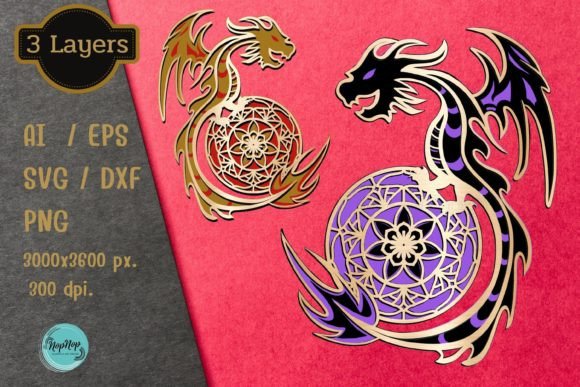
The 3D Layered Dragon design asset brings a new level of depth and visual impact to creative projects, transforming flat imagery into stunning, tactile art. This isn't just a single graphic; it's a meticulously crafted set of layered files designed for creators who value dimension and detail. With a generous artboard size of 3000 × 3600 pixels (10 × 12 inches) at 300 DPI, the files ensure high-resolution output suitable for both digital displays and crisp physical prints. Each download includes three distinct layered designs, packaged in a convenient zip file for immediate access.
A Versatile Toolkit for Makers and Designers
What makes this collection particularly valuable is its broad compatibility. The download includes files for numerous popular design and cutting platforms, ensuring seamless integration into your existing workflow.
- AI, EPS, SVG, DXF: Vector formats for Adobe Illustrator, Corel Draw, Inkscape, Cricut Design Space, Silhouette Designer Edition, Glowforge laser cutters, and more.
- PNG: High-quality raster files. Note that while sample images show color, the actual PNG files are provided in black. You will also receive colored PNG files for printing, offering direct use for digital projects or as a starting point for custom coloring.
This makes the 3D Layered Dragon a perfect design asset for laser cutting intricate models, creating standout clipart for printing, or developing unique digital download products like wall art, stickers, or scrapbooking elements.
Practical Applications and Creative Freedom
Imagine the possibilities. This design can be the centerpiece of a bold logo design for a gaming channel or fantasy brand, instantly conveying power and mystique. For packaging design, a layered dragon motif adds a premium, handcrafted feel to product boxes, especially when cut from specialty cardstock or wood. In poster design or editorial design, the dimensional effect captures attention and adds a sophisticated element to layouts.
The layered nature encourages experimentation. As suggested, choose paper of different colors when cutting to create custom combinations. Use metallic, glitter, or textured papers to make the dragon truly unique. The PNG files are also excellent social media graphics, ready to be incorporated into banners, thumbnails, or promotional posts to build a cohesive brand identity.
Tips for Selecting and Using Layered Designs
When incorporating a complex asset like this into your work, consider these points for the best results:
- Test Readability and Scale: View the design at the size you intend to use it. The intricate details of a dragon are stunning up close but ensure key features remain clear when scaled down for smaller applications like web design elements or merchandise.
- Match the Project Mood: The dragon is inherently dramatic. It pairs well with projects aiming for a fantasy, epic, edgy, or powerful aesthetic. For a more balanced composition, consider using it alongside clean sans serif fonts or elegant script fonts to create interesting font pairing contrast.
- Review File Formats: Ensure the included formats (SVG, DXF, etc.) are compatible with your software or cutting machine. This foresight prevents workflow interruptions.
- Understand the License: Always confirm the usage rights align with your project, whether for personal creations or commercial products.
Investing in a high-quality, versatile asset like the 3D Layered Dragon is an investment in your creative toolkit. It saves countless hours that would be spent attempting to model and layer such a complex form from scratch. The professional finish and visual depth it provides can elevate a simple project into a memorable piece, strengthening visual consistency and making your work stand out in a crowded digital landscape. It’s more than a cut file; it’s a foundation for imagination.